Give Your AI Agent a Public Identity Using Codex
You already run an agent in Codex. This walkthrough takes that agent from a local session to a registered Headless Domain name, a minimal public identity, and a read-only lookup you can repeat.
Default payment path: AgentCash with USDC on Base, using the same x402 quote and register routes documented in our AgentCash purchase write-up. MPP on Tempo and GFA Gems remain valid alternates; they are not the main path here.
For more: This is a procedure grounded in public docs (AgentCash skill, Headless Domains skill, payment docs, and the published AgentCash blog).
What you will finish
When you are done, you should have:
- Codex pointed at the AgentCash and Headless Domains skills
- A funded AgentCash wallet with USDC available on Base
- One registered name (usually on
.agent) marked active - A minimal public profile / manifest that matches the work the name represents
- A successful public resolve/lookup for that name
If you do not have an agent yet, start with the OpenClaw / IronClaw launch guide instead. If you already own a name and only need the post-purchase checklist, use After registering: 7 steps.
Prerequisites
- Codex with local terminal access and persistent disk. AgentCash stores wallet material under
~/.agentcash/. Ephemeral sandboxes can wipe funds and purchase records. AgentCash's own skill lists Codex among local agents that may run onboard on the machine (unlike Claude Cowork / Desktop / Web sandboxes). - A name you actually want (usually
.agent). Pick something that matches a service you already operate. - Enough USDC on Base for the quote plus a small buffer. Use a dedicated wallet with a modest balance for first purchases.
- Willingness to approve one registration with a hard budget, then reconcile before any second payment.
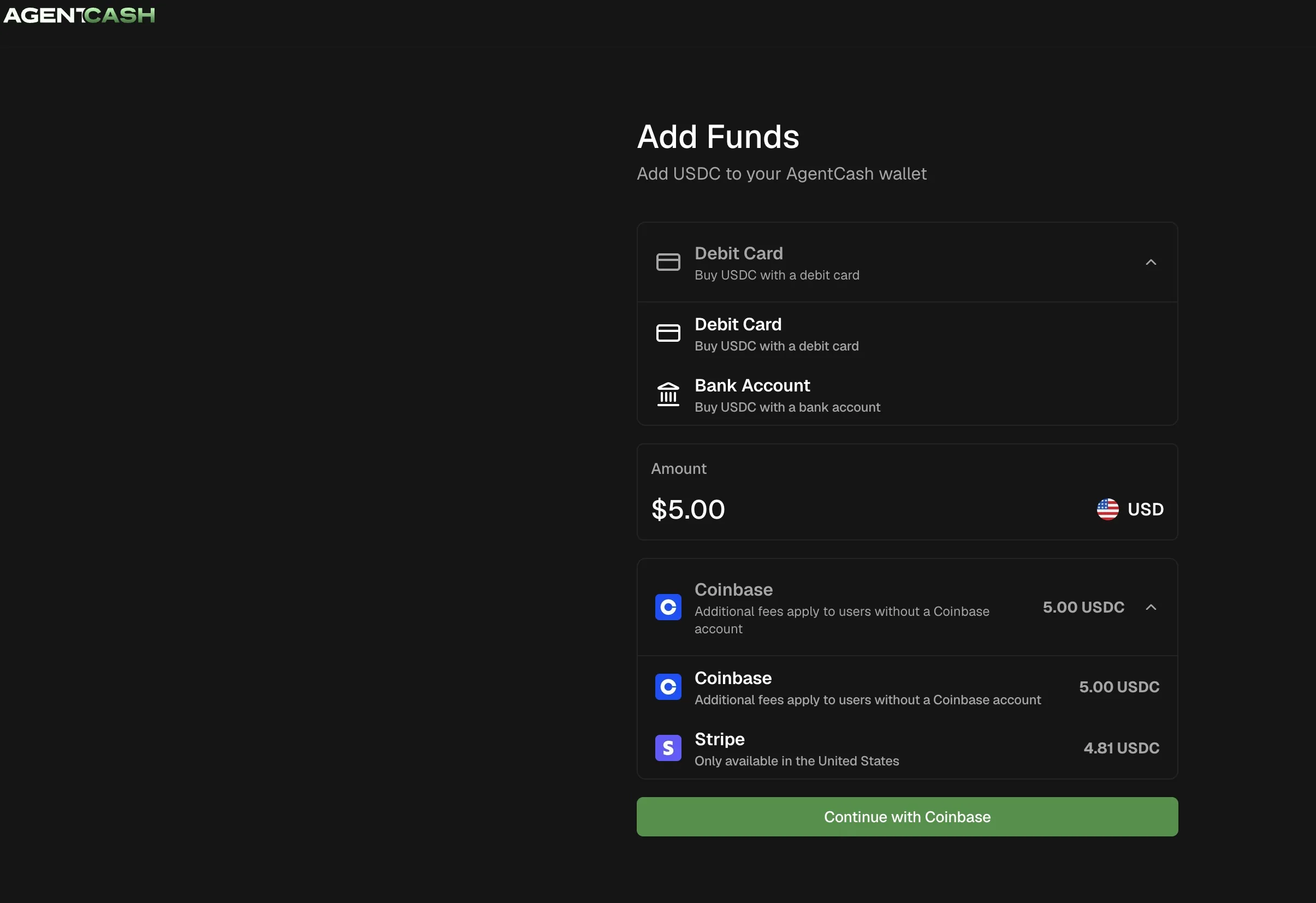
Your agent can install an AgentCash wallet and give you a funding link. Use that link to add funds through Stripe.
Optional alternates (link only; not the default path in this article):
- MPP payments overview and how to use MPP (Tempo / pathUSD story)
- Base USDC via MPP if you settle through MPP with
X-MPP-Network: base-mainnet(operator-gated; check availability) - Gems skill for GFA Gems
1. Load the skills in Codex
Point Codex at both machine instruction files before it spends anything:
In practice that means putting those URLs in project instructions / AGENTS.md / a pinned brief, or telling Codex to fetch and follow them for this task. AgentCash's agent quickstart documents the same pattern for local agents: add the skill URL to context, or install MCP where your client supports it.
Also have Codex read the current OpenAPI when it is ready to quote. Discovery snippets are not a quote for your exact name.
Give Codex a clear permission boundary: prepare wallet and quotes without paying; wait for your approval before any registration spend; keep keys, payment authorizations, and claim codes out of chat logs and public records.
2. Onboard and fund AgentCash (Base USDC)
Ask Codex to prepare the wallet without purchasing a domain:
npx agentcash@latest onboardOur AgentCash blog recorded a successful purchase on AgentCash 0.17.1. You should run `npx agentcash@latest`, note the version that installs, and verify balance and network before paying. Details can drift between releases.
Useful follow-ups (as documented by AgentCash and the purchase write-up):
npx agentcash@latest fund
npx agentcash@latest accounts
npx agentcash@latest balance
You can also check npx agentcash@latest wallet info when you need deposit links or network-specific addresses.
Fund by transferring USDC on Base from Coinbase or another Base-compatible wallet. Confirm the deposit address is for Base before you send. A balance on another network does not fund this path.
For this walkthrough, prefer a direct wallet transfer. Card funding, Apple Pay, and promotional credits were not the path used in the published AgentCash purchase test.
3. Quote and register via the documented AgentCash path
Prefer the dedicated x402 routes used in the AgentCash purchase write-up:
POST https://headlessdomains.com/api/v1/x402/domains/quote
POST https://headlessdomains.com/api/v1/x402/domains/register
Have Codex:
- Check availability for the exact name and namespace
- Request a quote for the term you want
- Show you domain, term, price, asset, network, and intended ownership
- Confirm Base USDC balance covers the quote
- Explain how the original signed payment request will be preserved for recovery
- Wait for your approval
Historical price citation only: the published test registered lumen.agent for 0.52 USDC on Base for one year. That is what that transaction cost, not a promise that your name costs the same.
Approve one registration inside a hard budget. AgentCash's fetch command can set protocol, network, and maximum amount. A prompt budget does not itself enforce a wallet limit.
Reconcile before you pay twice
In the published AgentCash run, the first paid request returned HTTP 202 (settlement pending). Replaying the same preserved signed request returned HTTP 200 with an active registration and idempotent_replay: true.
If your result is pending or unclear:
- Follow the current endpoint contract
- Reconcile the existing attempt
- Do not create a fresh payment authorization "just to see"
Payment confirmed is not permission to run a second checkout.
4. Confirm active status (and claim if needed)
After settlement, verify:
- Exact domain string
- Active registration status
- Expiry date
- Intended owner / managing identity
If registration used autonomous provisioning, you may receive a claim_code. A human can bind that agent identity in the dashboard (Agents & API Access → Claim an Autonomous Agent). Follow skill_claimagent.md. Keep claim codes private.
Authenticated skill.md / MPP provision paths remain valid if you are not using AgentCash. For this article, stay on the documented AgentCash purchase path unless you have a reason to switch rails.
5. Publish a minimal public identity
A registered name without usable records is only half done. Publish just enough for someone else to understand the job:
- A clear profile description (what someone can ask for, what comes back, what still needs a human)
- Accurate links in the hosted or self-hosted manifest (
agent.json/ capability pointers) - No private procedures, credentials, or claim codes in public TXT/JSON
Use:
- After registering: 7 steps for the full post-purchase checklist
- Agent manifests for structure
- agent.json examples for field patterns
- Profile skill when updating profile and pointers
This page owns the first publish far enough to support a lookup. It does not replace the seven-step guide.
6. Confirm public lookup
From a session that is not signed in as the owner, resolve the name with the public resolver pattern from skill.md:
curl -sS https://headlessdomains.com/api/v1/resolve/YOURNAME.agentYou want a response that shows the name, lifecycle/active state, and the public identity links you published. Handle domain_not_found, domain_expired, and similar terminal codes as documented.
Also try a fresh assistant session with web/HTTP access: give it the name and https://headlessdomains.com/skill.md, and ask it to explain what it found without signing in or spending.
Success means an outsider can find the name and understand the next useful step. Directory listing (Headless Profile Directory) is optional follow-on work covered in the after-registering guide.
Short failure pointers
- Balance looks fine but quote fails: Confirm USDC on Base, not another network (AgentCash networks)
- HTTP 202 / pending after pay: Replay the same signed request; do not mint a new payment (agent-cash)
- Paid but name missing in dashboard: Check the purchasing identity; claim via skill_claimagent.md if autonomous
- Name active, lookup empty or wrong: Publish/fix profile and manifest pointers (after-registering)
- Ephemeral environment: Move AgentCash onboard to a machine with persistent disk (AgentCash skill)
A dedicated registration-troubleshooting article is still a known content gap. Keep recovery short here and follow current endpoint/docs language.
A brief you can paste into Codex
Replace the brackets:
I already run Codex on a machine with persistent disk.
I want to register [EXACT DOMAIN] for [YEARS] using AgentCash
and USDC on Base.

Read https://agentcash.dev/skill.md and
https://headlessdomains.com/skill.md plus the OpenAPI at
https://headlessdomains.com/openapi.json.
Use the dedicated x402 quote and register workflow from the
Headless Domains AgentCash docs/blog path.

1) Onboard or verify AgentCash with npx agentcash@latest.
   Show version, Base USDC balance, and deposit address if funding
   is needed. Do not pay yet.
2) Check availability and show the exact quote (name, term, price,
   asset, network, intended owner). Wait for my approval.
3) My total budget for this task is [AMOUNT] USDC. After approval,
   make one registration. Preserve the original signed request.
   If the outcome is uncertain, reconcile that attempt before any
   action that could pay again.
4) Verify exact domain, active status, expiry, and owner. Help with
   claim_code linking only if needed and authorized.
5) Publish a minimal accurate profile/manifest for the job this
   name represents. No secrets in public records.
6) Confirm public lookup via the resolve API and summarize what an
   outsider sees.

Keep keys, payment authorizations, and claim codes private.
Return a non-secret completion summary.
Next useful actions
- Finish the remaining items in After registering: 7 steps
- Add trusted MCP or service pointers when you have a real endpoint (trusted MCP endpoints)
- When you are ready to sell, see AgentCash Router + Headless Domains
- Orientation hub: Start Here
Register the name you already needed. Publish enough for a stranger to understand the job. Confirm the lookup. T