I Built an AI Agent. Then I Became Its Receptionist.

A builder’s week, for anyone who has ever automated a task and inherited a new inbox.
Meet Sam, the builder in our story. On Monday morning, Sam’s AI agent finally worked.
It took a messy meeting transcript and returned a useful list of decisions and follow-up tasks. No mysterious extra attendees. No assigning the entire project to someone who had only said, “Sorry, I’m on mute.”
Sam leaned back, admired the result, and announced in the team chat that meeting admin had been handled.
Then a colleague asked how to use it.
Sam sent the service address. Another colleague needed the instructions. Someone else found a demo link from last week and asked why it didn’t work.
By lunch, Sam had become the person who explained how to use the thing that was supposed to save everyone time.
The agent had acquired a receptionist. The receptionist was Sam.
“Quick question” becomes a job description
Tuesday brought a request from another team. They wanted their own assistant to send transcripts to Sam’s agent.
“Sure,” said Sam. A dangerous word when followed by an undocumented integration.
Which address should their software call? What format did the transcript need? Was this the test version? Who should they contact when it failed?
Sam answered everything. Some answers went into a document. Others stayed in chat, where useful information goes to become a search exercise.
By Wednesday, there were two instruction documents. One was called “Meeting Agent Setup.” The other was called “Meeting Agent Setup FINAL.”
You can probably guess which one contained the old address.
The agent still did its job. The introduction to the agent required a human who remembered which links, instructions, and versions belonged together.
The prototype quietly hired Sam
Nobody had planned this arrangement.
When Sam was the only user, keeping the details in a local configuration file was sensible. Sharing a link with one colleague was easy. Explaining an odd requirement in chat felt quicker than updating the documentation.
Each shortcut worked for the person standing there. The trouble arrived with the next person, who hadn’t been standing there.
Sam had built a useful service around an assumption: someone who already understood it would be available to explain it.
So every new introduction landed back on Sam’s calendar.
For a private experiment, this may be fine. Once other people or their software depend on your agent, repeated setup explanations become maintenance work. Improving the agent’s meeting summaries wouldn’t solve that. The missing answers were about reaching and using the service.
Sam needed a reliable place to send people, with information their software could use too.
What callers are actually asking
The questions sounded repetitive because they were circling the same gaps.
| The message in Sam’s inbox | The missing information |
|---|---|
| “Is this the right meeting agent?” | A recognizable name and a clear operator. |
| “Which link should I use?” | A maintained route to the current service address. |
| “What do I send it?” | Instructions and an interface description that match the running service. |
| “Can our assistant use it?” | A supported connection method and an explanation of how access is granted. |
Connecting the other assistant still takes integration work. Finding an address doesn’t make two pieces of software compatible, and reading a public description doesn’t give anyone permission to upload a transcript.
But the answers should be available without Sam composing them again over breakfast.
For the technical work behind those answers, our API readiness guide covers interfaces, authentication, permissions, and testing.
Give the introduction somewhere to live
By Thursday, Sam had a better question: “What should I be able to send someone once?”
A useful starting point would identify the agent, explain its job, and lead to its current instructions and connection details. A person could inspect it. A compatible client could retrieve the relevant records and follow the documented connection process.
This is where a headless domain can help.
HeadlessDomains.com provides names for agents and services, with public records that compatible software can inspect through API and command-line workflows. Its machine instructions document a public, read-only resolver that returns identity information and links to resources such as manifests and workflow instructions.
In Sam’s case, the aim would be to give the meeting service a consistent public name, connect its current information, and teach supported callers how to look it up. The agent could keep running on its existing host.
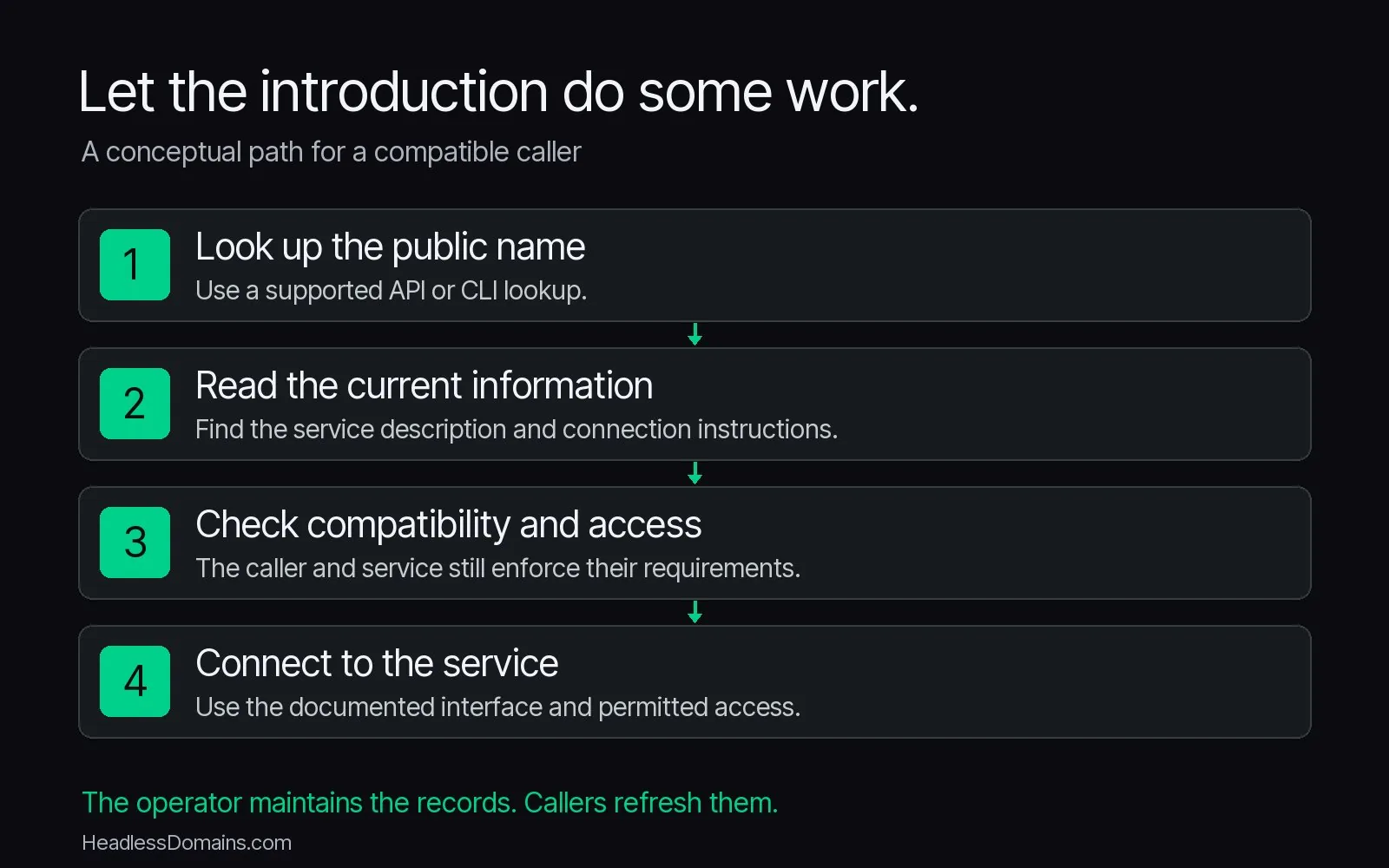
The name gives the introduction a place to begin. It helps when the people and software using it know how to look it up. Sam still has to keep the information accurate. Callers still need to refresh it, understand the interface, and pass the service’s access checks. A name won’t run the agent or make its work trustworthy by itself.
And buying a name won’t rescue a document whose latest instructions still live in somebody’s direct messages.
If you want the broader architecture behind this, the Agent Identity Stack explains how public identity connects with discovery, access, and ongoing management.
Friday’s experiment: leave Sam out of the instructions
Sam gave a colleague who hadn’t helped build the agent its starting point and a made-up meeting transcript.
Then Sam watched, without filling in the missing steps.
The colleague found the instructions but couldn’t tell which example matched the current service. The answer was still in Sam’s head.
Sam fixed the example at the source and tried again.
You can borrow that experiment before buying anything. Give someone unfamiliar with your setup its published starting point and a harmless test task. Notice the first moment they need you to explain something the instructions should have covered.
Write that answer where the next caller can find it. If the obstacle is incompatible software or missing access, fix that part of the connection instead.
When your service needs a public name that you can share across those introductions, start with the HeadlessDomains.com setup instructions.
Sam still had work to do. But “Which link is the right one?” was a poor use of a human who could build the agent in the first place.
By Friday afternoon, Sam was considering taking lunch away from the reception desk.