What Is SKILL.md? Agent Skills Explained With an Example
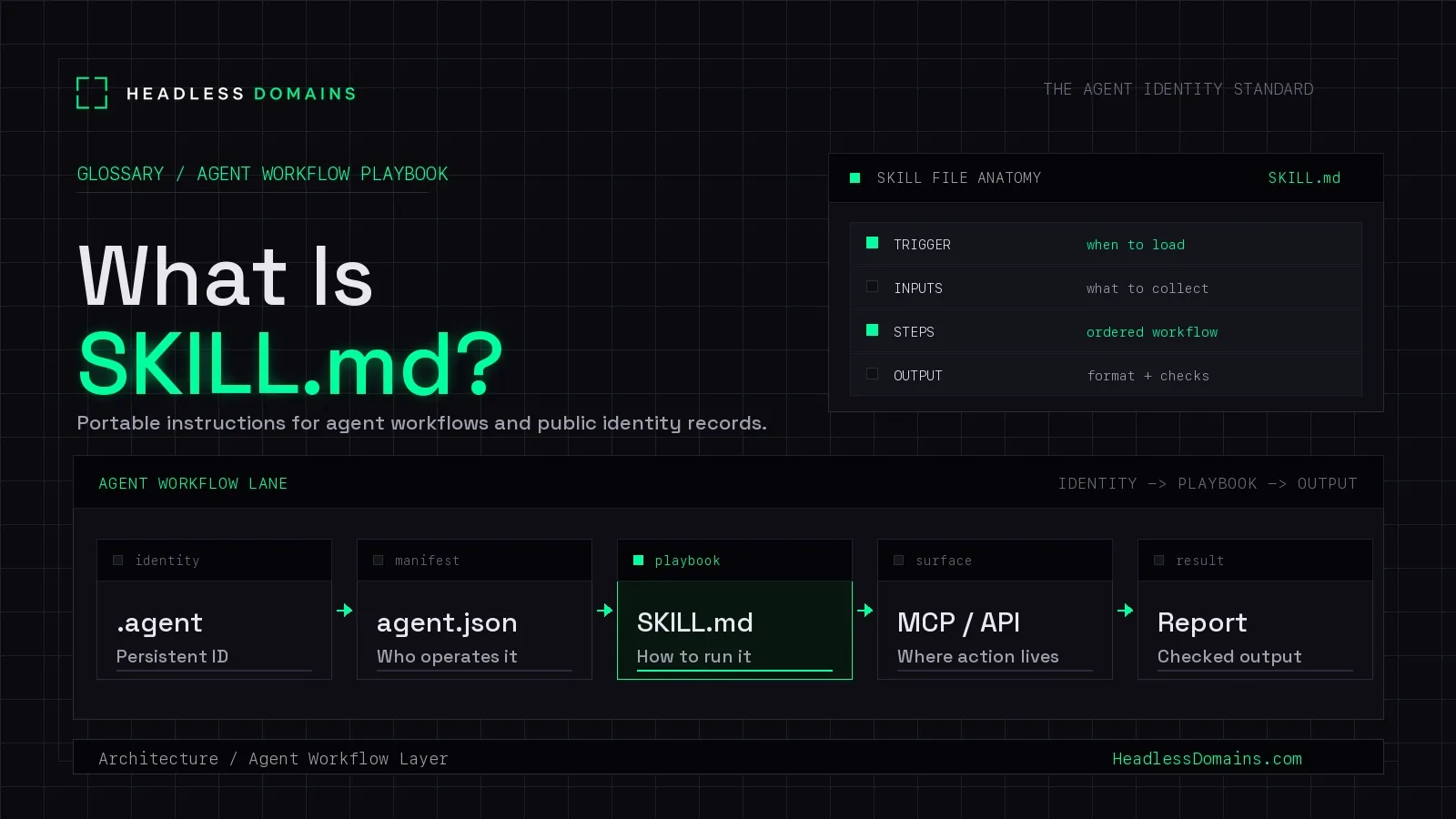
SKILL.md is a Markdown playbook that tells an AI agent how to perform a repeatable workflow: when to use a capability, which inputs to collect, which steps to run, what format to return, and which checks to finish with.
When you are asking what is SKILL.md, think of the file as operating instructions for agents, not a marketing page for humans.
When using Headless Domains, SKILL.md sits beside agent.json, llms.txt, OpenAPI, MCP, and .agent records. A SKILL.md file can explain how an agent should inspect a domain, verify a persistent identity, follow an agentic web onboarding flow, or publish an output without inventing missing steps.
The Short Version
| Artifact | Agent question | Publishes | Best use |
|---|---|---|---|
| SKILL.md | How should the agent run this task? | Workflow steps, inputs, output format, and final checks | Public playbooks and task-specific agent behavior |
| agent.json | Who operates this surface? | Identity, capabilities, endpoints, owner, and proof links | Public agent identity and verification |
| llms.txt | Which pages are worth reading first? | A curated map of high-value content | Docs, hubs, policies, and support pages |
| OpenAPI / MCP | How can the agent call tools or APIs? | Endpoint contracts and tool interfaces | Action surfaces after identity inspection |
How SKILL.md Works
OpenAI's Skills overview describes SKILL.md as a Markdown playbook for repeatable workflows. The file can live in a skill folder with supporting templates, examples, references, or scripts, but the Markdown file is the instruction layer the agent reads before acting.
A useful SKILL.md file names the task, says when to use the skill, lists required inputs, gives ordered steps, sets boundaries, states the output format, and ends with final checks. The structure helps an agent reuse the same process across chats, repos, products, and teams.
What Belongs in the File
- Purpose: one specific workflow, such as verifying a .agent record or preparing an endpoint inspection.
- Trigger: when the agent should load the skill.
- Inputs: domain, API URL, operator name, auth context, expected output, or policy path.
- Workflow: numbered steps with decision points and fallback behavior.
- Boundaries: actions that require approval, secrets that stay out of the file, and cases the agent must escalate.
- Output: exact format, fields, table columns, files, or summary style to return.
- Final checks: validation commands, review questions, or handoff criteria.
SKILL.md in the Agent Identity Stack
SKILL.md is not a replacement for a public identity record. The file tells an agent how to act; agent.json identifies the agent, operator, capabilities, endpoints, and proof links. llms.txt maps useful pages. OpenAPI and MCP describe callable surfaces.
That separation gives each artifact a clean job. The Agent Identity Stack can point agents to the same .agent identity, then to the manifest, playbook, content map, API contract, and tool metadata that support the workflow.
Example SKILL.md Structure
---
name: domain-verification
description: Verify a .agent identity and return an inspection report.
---
# Workflow
1. Collect the domain, operator, and expected output.
2. Resolve the .agent record and inspect linked agent.json.
3. Confirm SKILL.md, llms.txt, OpenAPI, and MCP links use stable URLs.
4. Flag missing proof, stale owner data, or unsupported actions.
5. Return a concise report with checks, gaps, and next steps.
Implementation Checklist
- Give each SKILL.md one narrow workflow instead of a broad product manual.
- Use descriptive frontmatter so agents can decide when to load the playbook.
- Keep public instructions free of secrets, private tokens, hidden endpoints, and staging-only paths.
- Link the SKILL.md URL from agent.json or a .agent identity record when the workflow is part of public identity.
- Add final checks that an agent can actually run or answer.
- Version the file in the same review process as docs, API contracts, and product policy.
- Test the workflow with a fresh agent session before publishing the file.
Where Headless Domains Fits
Headless Domains gives SKILL.md a persistent identity anchor. A .agent, .chatbot, or .boss record can connect the playbook to agent.json, TXT proof, MCP endpoints, OpenAPI files, profile pages, and payment metadata, so another agent can inspect one named source before using the workflow.
Start with The Agent Identity Stack to see where the playbook fits, then register a .agent identity when your agent should publish a stable public workflow for discovery, verification, or agentic web participation.
Where to Go Next
For the broader publishing model, compare llms.txt, SKILL.md, and agent.json. If the next task is site preparation, use the AI-readable website guide to connect clean content, public identity, and callable surfaces.
FAQ
What is SKILL.md in one sentence?
SKILL.md is a Markdown file that teaches an AI agent how to complete a repeatable workflow with defined inputs, steps, outputs, and checks.
Is SKILL.md only for coding agents?
No. Coding workflows are common, but SKILL.md can also guide support triage, content production, domain inspection, onboarding, policy review, and product operations.
Where should a public SKILL.md file live?
Use a stable URL such as /SKILL.md, a documented well-known path, or a link from agent.json and a .agent identity record. The key requirement is that agents can resolve the current workflow from a trusted public source.
Is SKILL.md the same as agent.json?
No. SKILL.md is the workflow. agent.json is the identity and capability manifest. A public agent can use both: agent.json says who operates the agent and SKILL.md says how a task should run.
Can SKILL.md include scripts or templates?
Yes. A skill package can include supporting scripts, templates, references, and examples. Public packages should make optional resources explicit and require approval before any sensitive action.
How does SKILL.md support the agentic web?
SKILL.md gives agents task instructions that can travel with a persistent identity. When the playbook is linked from a .agent record, other agents can inspect the named workflow before they trust the output.