Chat SDK: Turn Agent Answers into Slack and Teams Cards
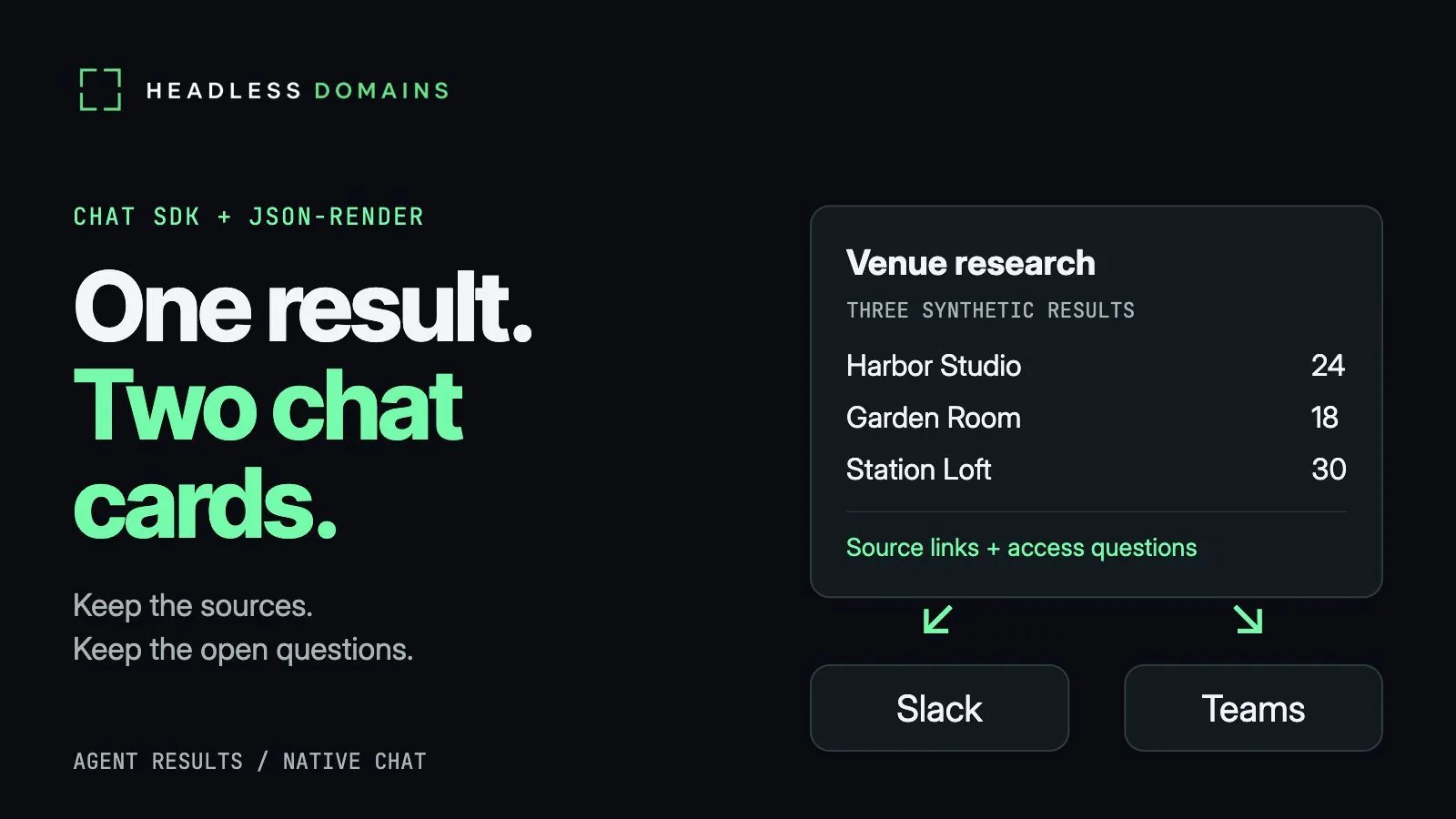
A venue-research agent finds three rooms for an 18-person meeting. One fits everyone exactly. Another has room to spare. The third offers a lift, although nobody has supplied its door width. You have an answer, but you still have a decision to make.
A useful chat card brings the comparison into view: capacity beside access details, evidence within reach, open questions where you can see them. With Chat SDK and json-render, an agent service can present a structured result through Slack and Teams without writing a separate answer for each channel. The interesting part comes when you decide what deserves space in the card.
Vercel announced the integration on November 6, 2026. It gives developers a way to turn agent output into native chat cards, including cards which update while generation continues. For the person waiting in chat, the payoff is more ordinary and more useful: less digging through a long reply to find the detail which changes the decision.
Chat cards make venue research easier to inspect
Imagine a service called Venue Scout. In a synthetic example, it returns Harbor Studio with capacity for 24, Garden Room with capacity for 18, and Station Loft with capacity for 30. Every room clears the headcount requirement. A neat row of green ticks makes the job look finished.
Then you read the access notes. Harbor Studio has a step-free entrance and a lift, but the research leaves an open question about the accessible toilet. Garden Room sits on the ground floor, behind two entrance steps. Station Loft lists a lift without giving its clear door width.
Garden Room fits 18 people on paper. The entrance has two steps. Reducing the answer to a green capacity badge quietly throws away the more interesting part. Keep the access note beside the open question, with the source one click away. A polished card has no special talent for measuring a doorway.
The card earns its space by letting you compare the rooms without reconstructing the research. You can see which venue merits a follow-up, open the evidence, and pass a useful question to a colleague. The agent has made the decision easier to inspect while leaving the unresolved parts visible.
Chat SDK and json-render carry one result into Slack and Teams
Behind the card, json-render lets a developer define a catalog of permitted components. For Venue Scout, a table handles capacities, text carries the access notes, and source-link buttons open the evidence. The application controls the available building blocks and their limits. A model can work within the catalog, or the application can assemble a card directly from structured data.
Chat SDK’s adapters translate the shared card into the destination’s format: Block Kit for Slack and an Adaptive Card for Teams. The layouts can differ. The venue names, capacities, access notes, questions and source links travel together. Your colleague in Teams gets the same research even when the arrangement looks different from yours in Slack. The Chat SDK card documentation covers the rendering details.
A source button has a modest but valuable job. It opens the supporting page. It does not book Garden Room or grant the agent permission to make a reservation. Keeping the button’s promise clear helps the reader distinguish inspecting a result from committing to an action.
Choosing how people contact the service comes earlier; the agent-inbox guide covers intake channels. Here, the research has already happened. The card carries the answer back to someone who wants to use it.
A valid card can still leave out the answer
Software can reject a malformed component. It can catch a number where a text value belongs. It cannot establish whether the lift at Station Loft accommodates a particular wheelchair merely because the card passes validation.
There is a quieter problem, too. A card containing only the capacity table can satisfy the component rules while omitting every access note and question. Nothing looks broken. The application has presented less information with more confidence.
Streaming makes the distinction visible. The renderer can display a partial card before generation finishes, then update the message as more content arrives. A reader may see the capacity comparison before the explanation about Garden Room’s entrance. If generation stops halfway through, a colleague can mistake the early message for the complete answer while the failure sits in a server log.
Venue Scout’s example treats every streamed version as a draft. Only after structure and content checks pass does the application present the final card. If either check fails, it replaces the draft with a summary drawn from the original research, including all three venues, their evidence and their unanswered questions.
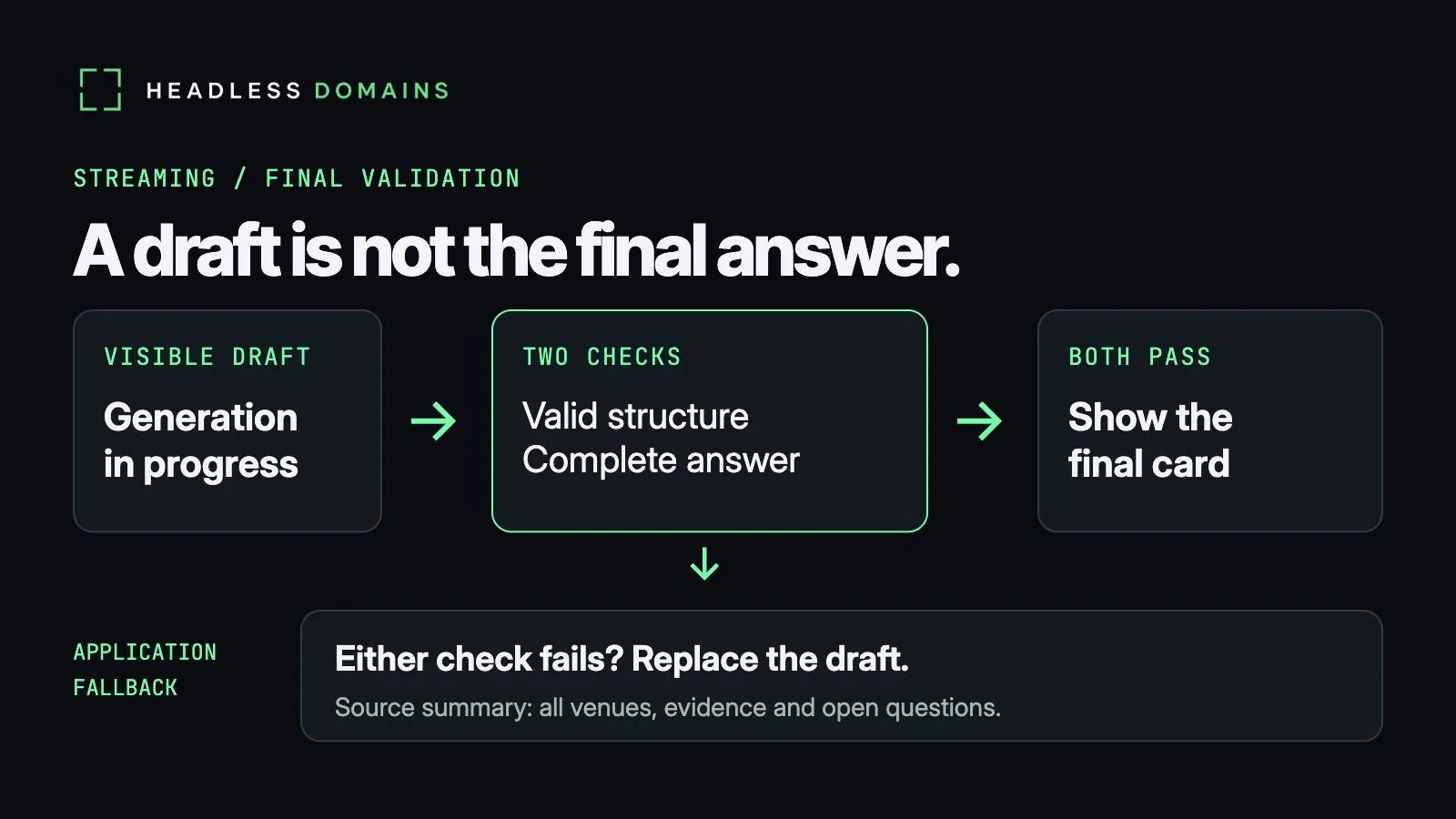
The fallback preserves the work the reader came for. Garden Room’s entrance still deserves a follow-up whether the answer arrives in an attractive card or a plain summary.
Keep venue evidence visible within platform limits
Slack and Teams place their own constraints on messages. In the Slack adapter, an additional table can fall back to a code block. A developer can instead set a renderer limit which rejects the extra table. The json-render chat reference explains the controls.
For three venues, one comparison table and a few short notes give the information room to breathe. A larger result may work better as a concise card linking to the full report. Cramming every finding into a message can send the reader back to the same hunting and scrolling the card was meant to remove.
The companion example uses synthetic venue records to exercise both native-format conversions, invalid component data, a table limit and an incomplete stream. It also checks the less obvious failure: a finished card with missing information. Those local checks inspect the generated payloads and recovery behavior; they do not demonstrate live Slack or Teams delivery.
You can explore other card shapes in the json-render examples gallery. Start with a result you already understand. Then ask whether the card leaves you better equipped to act on it, especially when part of the answer remains uncertain.
Give the agent service a public home across chat channels
Someone may first meet Venue Scout in Slack and later ask a colleague for its Teams entry point. A public agent identity connects both routes to the same service, giving people a place to return for its official application, documentation and contact information.
You can register a .agent name at HeadlessDomains.com and connect the service information through the registration and setup instructions. Point the public profile toward the official service page, where readers can find the supported chat entry points. The HeadlessDomains.com manifest documentation covers the service records. Registration supplies the public name; the application handles private research, conversations and access, alongside each platform’s installation.
Headless Domains and SkyInclude maintain CLI/API infrastructure for using headless names, so agents can work with the identity without browser-native DNS resolution. The same service can remain recognizable across several interfaces.
For Venue Scout, the standard stays pleasantly concrete. Can a colleague compare the rooms, open the sources and see what remains unanswered? If the card helps them ask about the two steps at Garden Room’s entrance, it has carried the research further than a tidy list of capacities ever will.
After registration, the onboarding walkthrough covers connecting your name to its public profile and service records.