Vercel Schedules: Let Customers Move an Agent’s Next Run
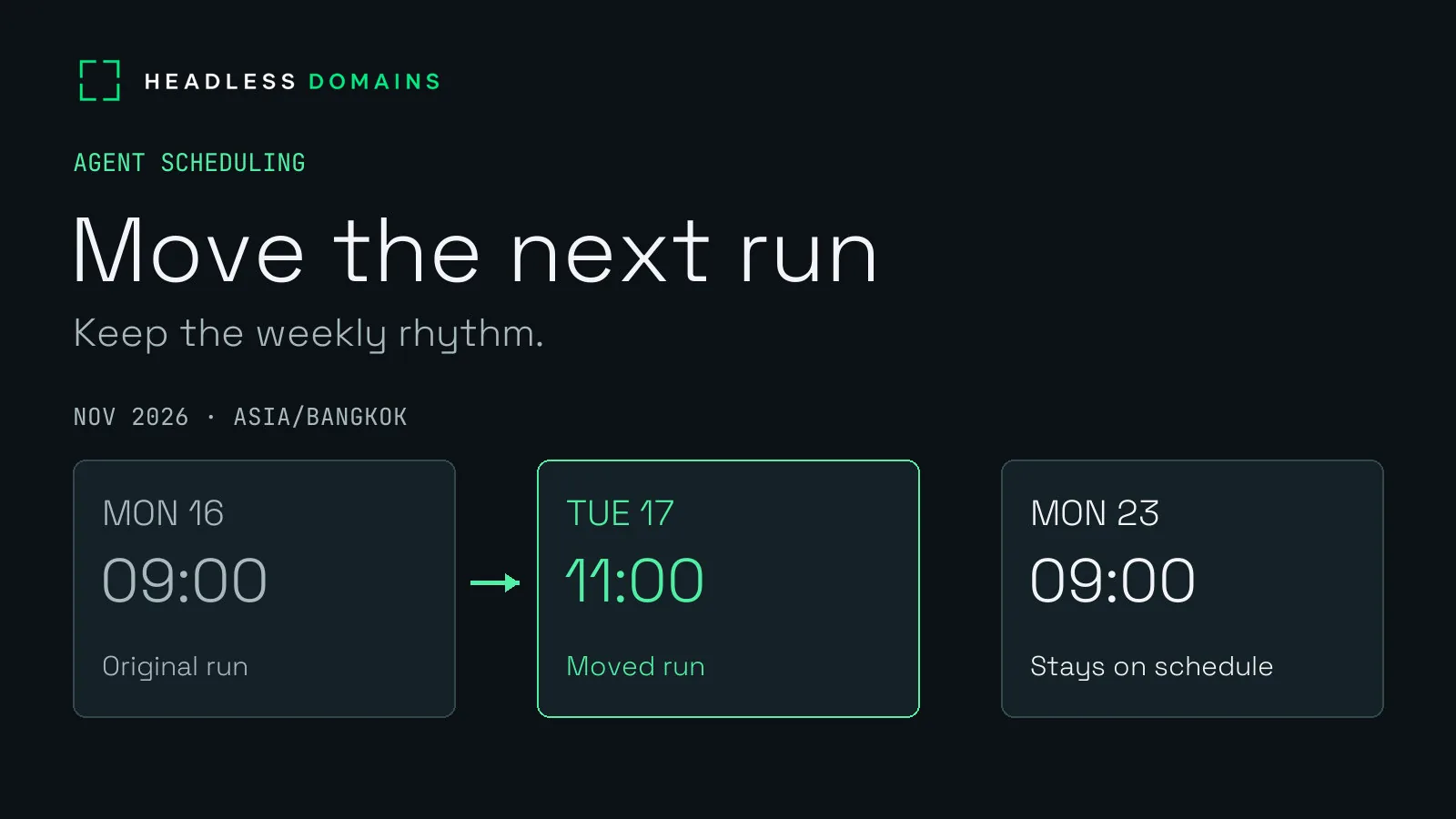
A customer has a perfectly ordinary request: move Monday’s report to Tuesday. Keep the following Monday as it is.
For an agent service, a calendar edit reaches further than the date on the screen. The service has already promised future work. Now it has to remember the new time, leave the rest of the schedule alone and give the customer a reliable way to stop.
Vercel Schedules lets applications create, change and cancel future triggers while the application runs, without a new deployment for every calendar change. Vercel introduced the product on November 4 and announced public beta on November 5. A customer can change the timing after placing the original request, through controls your service provides.
A weekly service earns its place in someone’s routine by surviving changes to the routine.
Let customers change an agent’s schedule
Imagine an accessibility-review service called Access Review. A customer selects public pages for review and asks for a weekly report in a private account. The service prepares observations for the customer to inspect; it makes no automatic website changes, sends no email and offers no accessibility certification.
The customer initially chooses Monday morning in Bangkok. Later, a meeting moves. Tuesday now makes more sense.
With dynamic schedules, your application can accept the change and update the future trigger directly. Static schedules keep their timing in deployment configuration. Legacy Cron Jobs remain a separate mechanism. The customer can make a calendar correction inside the service, without adding a task to a developer’s release queue.
Vercel’s dynamic schedules currently send work to Queue topics. Your application receives the message and prepares the report. The scheduling tool supplies the trigger; the service supplies the work, account access and result.
Move one report without moving every Monday
Consider two upcoming reviews: November 16 and November 23, both at 09:00 in Bangkok. The customer moves the first to November 17 at 11:00. The second stays exactly where it was.
Changing the whole weekly pattern would answer a different request. Suddenly every report arrives on Tuesday, and a small convenience has become another setting for the customer to repair.
Access Review can give each upcoming report its own one-time schedule while the application remembers the weekly preference. Moving one report changes one occurrence. The application creates later occurrences from the saved weekly rhythm. Vercel also supports recurring schedules; choosing separate occurrences here serves the particular promise of moving a single date.
The customer sees the consequence immediately: Tuesday at 11:00 for the next report, Monday at 09:00 for the following one. A confirmation becomes useful when it explains what changed and what stayed put.
Account boundaries remain just as important as calendar boundaries. Vercel’s customer namespaces organize schedules separately. Your application still checks the signed-in account before accepting an edit or showing a report. A tidy set of names never grants permission to read somebody else’s work.
Give scheduled reports an honest delivery window
“Monday morning” carries more meaning than a timestamp. The customer may plan to read the report before a meeting, share it with a colleague or use it to decide the week’s repairs. A service promising a useful morning report has to account for the time spent preparing it.
Vercel supports named timezones and a timing window called jitter. Hobby uses a 15-minute window; Pro and Enterprise allow 1–15 minutes. With a 15-minute setting, a 09:00 trigger normally starts within 09:00–09:15. Queue delivery and report preparation take additional time, and delays can extend arrival beyond the nominal window.
A customer-facing promise therefore includes a local delivery window and a visible preparation status. “Scheduled,” “preparing” and “ready” describe different moments. Calling a report ready when its trigger fires leaves the customer looking for a file nobody has finished.
Access Review can also define how late a report remains useful. A morning request arriving in the afternoon deserves a visible missed-run explanation or an agreed recovery action. Quietly doing yesterday’s work on today’s calendar creates more confusion than a clear status.
Make Pause stop future reports
Later, the customer pauses Access Review. Perhaps the site is quiet for a few weeks. The earlier reports still matter; fresh ones can wait.
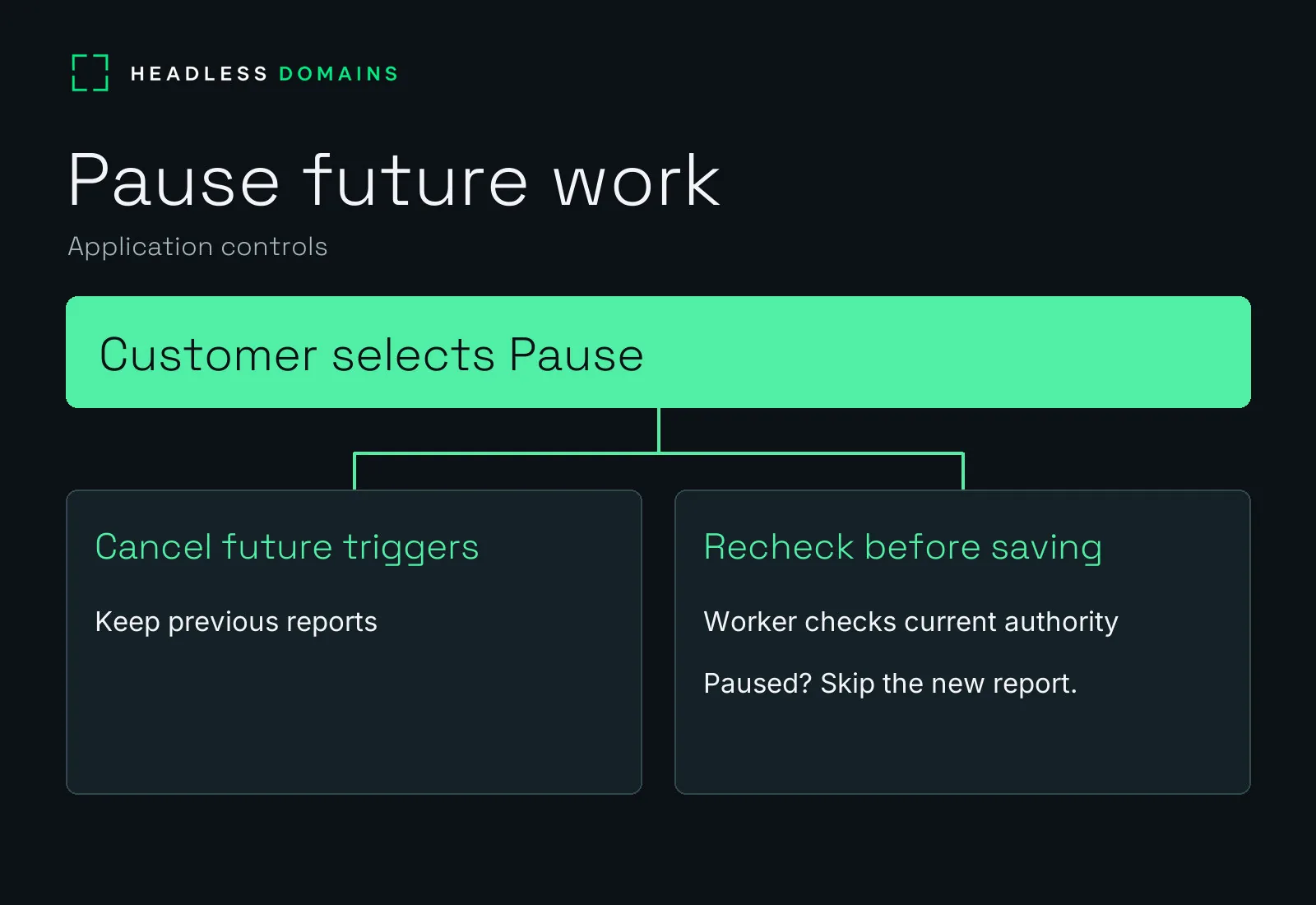
For the separate-occurrence design, the application stops creating future jobs and requests cancellation of the upcoming triggers. Vercel’s cancellation behavior draws a practical boundary: deleting a schedule stops future runs and skips work waiting for delivery, but work already delivered keeps running.
The application carries the customer’s decision across the remaining gap. A worker preparing a report checks the current account permission and pause status again before saving its result. Under Access Review’s policy, a pause arriving before the final save blocks the new report. A report saved earlier remains in the account history.
Access Review retains the customer’s pause even if schedule cleanup takes longer. The application blocks new reports while it resolves the provider state. For the deeper recovery problem, the agent retry and idempotency guide covers uncertain outcomes and duplicate work.
Resuming the service starts a deliberate new schedule. It never quietly replays the dates the customer canceled. The engineering earns its keep by making the button mean what it says.
Give the recurring service a public agent identity
A recurring relationship also gives customers a reason to return. They come back to move a date, read an older report or ask about a missed run. A public agent name connects those visits to the same service, even as individual jobs come and go.
For Access Review, the HeadlessDomains.com profile can carry the service name, a short description and a link to its official service page. The linked page brings together the schedule-management portal, documentation and support contact. Agent manifests give callers machine-readable identity and service pointers through maintained CLI and API infrastructure.
The public name identifies where to find Access Review. The signed-in application protects each customer’s dates, page selections and reports. Registration creates no automatic Vercel integration; your application connects scheduling to the service it operates.
You can register a public agent name at HeadlessDomains.com and use the setup instructions to connect its records to your service.
Back in the customer’s calendar, Tuesday’s report replaces Monday’s. The following week stays untouched. Later, Pause stops the new work without taking away the old reports. Nobody has to deploy a calendar correction.
The onboarding walkthrough covers the public records customers and agents use to find your service.