What Does Headless Mean? A Plain-English Guide to Headless Domains
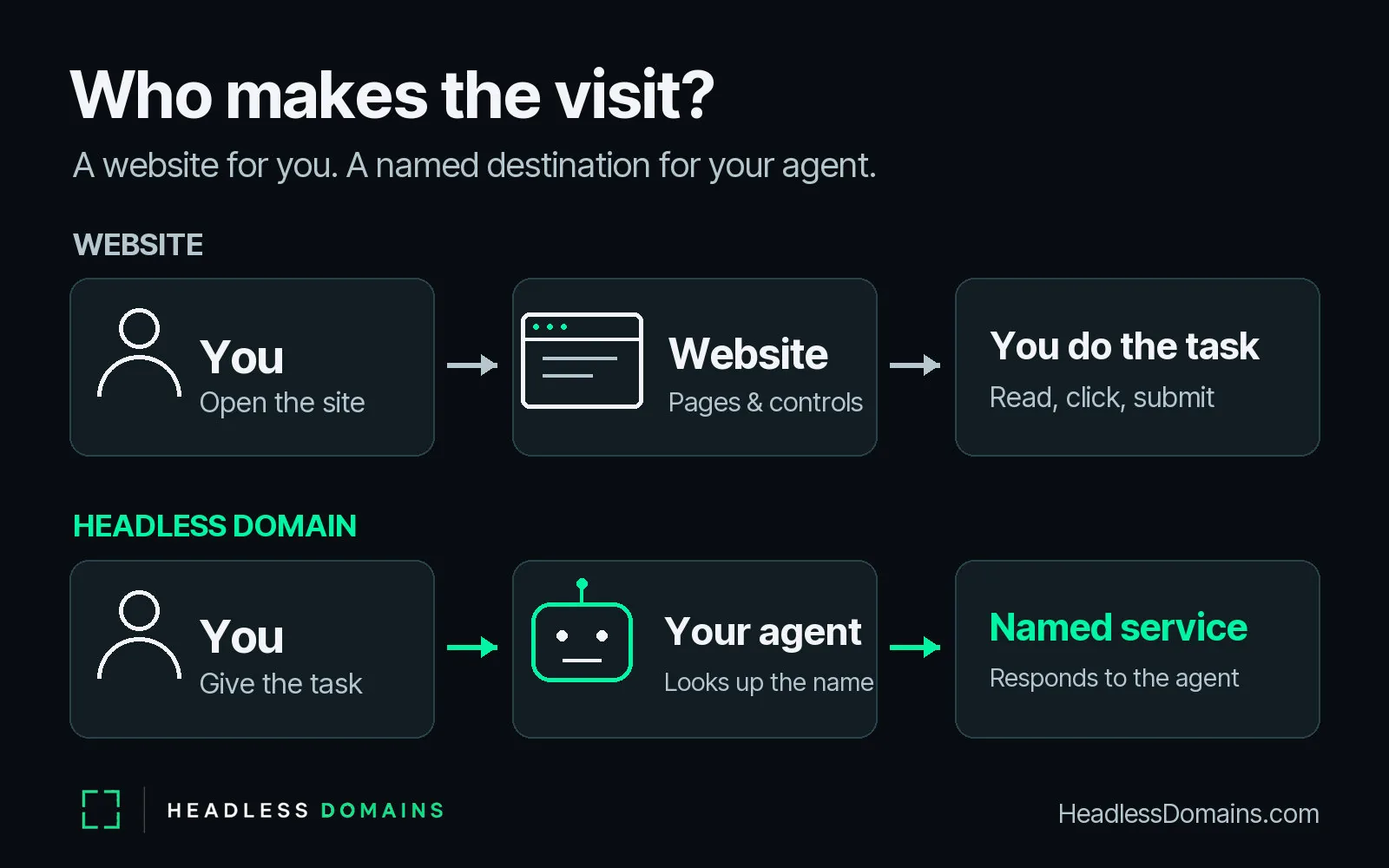
You know the routine: open a website, find the right page, read the details, click a button, fill in a form. Even a simple errand can turn into a small tour of the internet. An AI agent changes who makes that trip. You explain what you need, and software handles the steps it has the tools and permission to complete.
In technology, “headless” means a system can do its work without depending on its own visible, human-facing interface. The “head” is the screen, page, or controls a person uses. The underlying service keeps working when software accesses it directly, or when a separate interface presents it.
A headless domain applies that idea to a name. A website name is a place you go. A headless domain is a place you send your agent. The name leads compatible software to information about an agent or service and the routes for using it.
You already understand more of the idea than the terminology suggests. Start with the screen in front of you and the work happening behind it.
What does “headless” mean in technology?
Think about an ordinary online shop. You see product photos, menus, a search box, and an Add to Cart button. Behind that screen, other software stores the product details, checks inventory, calculates totals, and records orders.
The visible part gives you a way to use the underlying functions. Developers call that visible part the front end. They call the software and data behind it the back end.
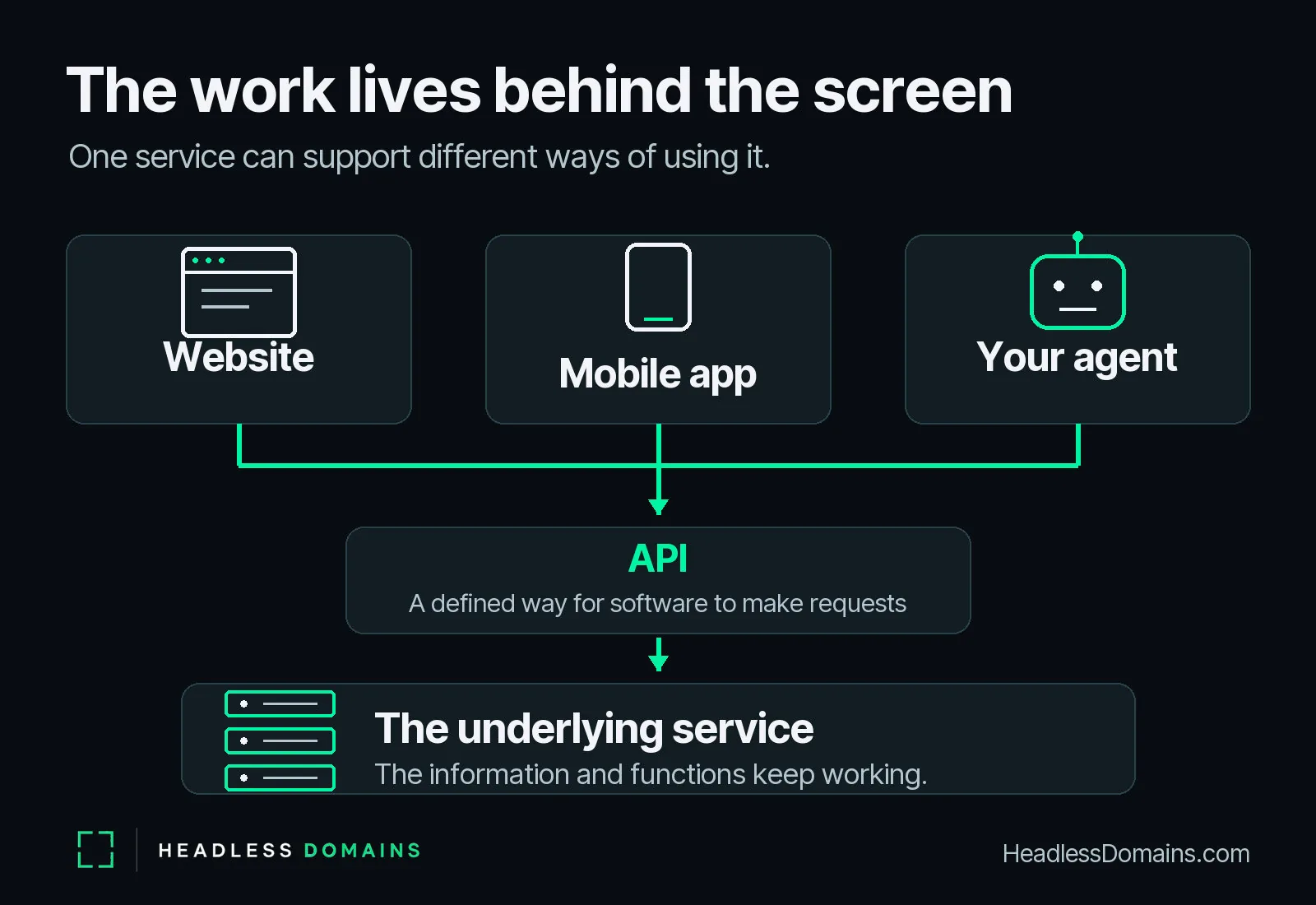
In a tightly connected system, the two come as one package. In a headless architecture, the back end exposes a way for other software to use its functions independently of that particular front end. A website, mobile app, or compatible agent can then use the service through an appropriate connection.
Picture a restaurant kitchen. Diners order through a waiter in the dining room, but the kitchen can also receive a collection order through another route. The cooking does not depend on a customer sitting at a particular table, reading a particular menu, or speaking to a particular waiter.
The dining room gives people an experience. The kitchen does the work. Separating the two lets the same kitchen serve different ways of ordering.
With software, an API often provides that other route. An API is a defined way for one piece of software to request information or an action from another. Instead of locating a button on a page, software sends a request in a format the service understands.
You don't have to learn the format to understand the benefit. The service can accept a request without making someone navigate its whole visual experience first.
The missing “head” is the interface
“Headless” sounds rather unfortunate if you picture something trying to think without a head. In this context, the intelligence, information, and useful functions remain. The word describes how you access them.
A headless system can still have a dashboard for its operator. It can still feed a beautiful website. It can have several interfaces, each designed for a different audience. The important point is that its core work does not depend on one built-in, customer-facing screen.
AI is a separate idea. A headless system can follow ordinary programmed rules without any AI at all. An AI agent is software that uses a model and tools to work toward a task you give it. Pair a compatible agent with a headless service, and the agent has a route to the work without requiring you to operate the service's website.
One word, several familiar uses
The exact meaning of “headless” depends on what someone is describing. The common thread is useful computing that operates independently of a visible interface.
| Term | What keeps working | What “headless” changes |
|---|---|---|
| Headless CMS | Storing and managing content, such as articles and product descriptions. | The content system supplies material to separate websites, apps, or other clients through an API. |
| Headless commerce | Commerce functions such as product data, inventory, and orders. | The storefront can change independently of the commerce engine. |
| Headless browser | Loading and processing web pages. | Software controls the browser without displaying its usual window. |
| Headless domain | A public name and its records for an agent, service, or system. | Compatible software uses the name to discover the service without relying on a person visiting a website. |
For the established technical uses, Adobe explains headless content management, Shopify describes the separation of storefront and commerce engine, and Chrome documents running a browser without its visible interface.
A headless browser still works with web pages. A headless domain gives an agent a name to look up and a route to inspect. Sharing the word doesn't make those two things the same product.
From visiting a website to sending an agent
Imagine you need a bicycle repaired before a weekend ride. Through a conventional website, you find the repair shop, look for the service you need, check opening hours, read the booking instructions, and send an enquiry. The shop has arranged the experience around your eyes, your reading, and your clicks.
Now imagine the shop offers a service that compatible agents can use. You tell your assistant: “Ask the bike repair service whether it can replace a brake cable before Saturday. Bring back the price and available times.”
Your assistant looks up the service's name, reads its published information, finds the supported enquiry route, and follows the access requirements. If the service accepts that request and supplies the details, your assistant brings them back to you. You decide whether to book.
You still set the goal. You still get the answer. You simply don't have to become the person who navigates every supplier's website along the way.
In this imagined example, a name such as spokefix.agent gives you a destination you can say, save, share, and return to. The repair service's operator connects that name to the information and working service the assistant needs.
The example depends on the repair shop providing the enquiry capability and the assistant supporting the connection. The name makes the destination discoverable; the service behind it handles the request. Asking for a price and making a paid booking remain different actions.
Headless domains give the agent a destination
A headless domain is a recognizable public name for an agent, service, or system, linked to records that compatible software can inspect. Those records help the caller understand what it has found and where to go next.
For you, the practical value starts with a simple instruction: send your agent to a named destination. You can refer someone else to that same destination, use it again next week, or build a routine around it.
For the agent, the destination needs more than a memorable label. It needs information it can use: the service's purpose, who operates it, and the current instructions or connection details. A human can infer a great deal from a well-designed page. Software benefits from clearly labeled records and documented ways to interact.
The HeadlessDomains.com agent guide describes the API and command-line infrastructure maintained by Headless Domains and SkyInclude for these lookups. An API lets software make requests; a command-line tool lets it issue text commands. Both provide ways to work with a name without depending on conventional browser resolution.
The human-facing HeadlessDomains.com website helps you explore and register names. The names themselves identify the agents and services you want software to find.
Behind the name: records, a service, and a result
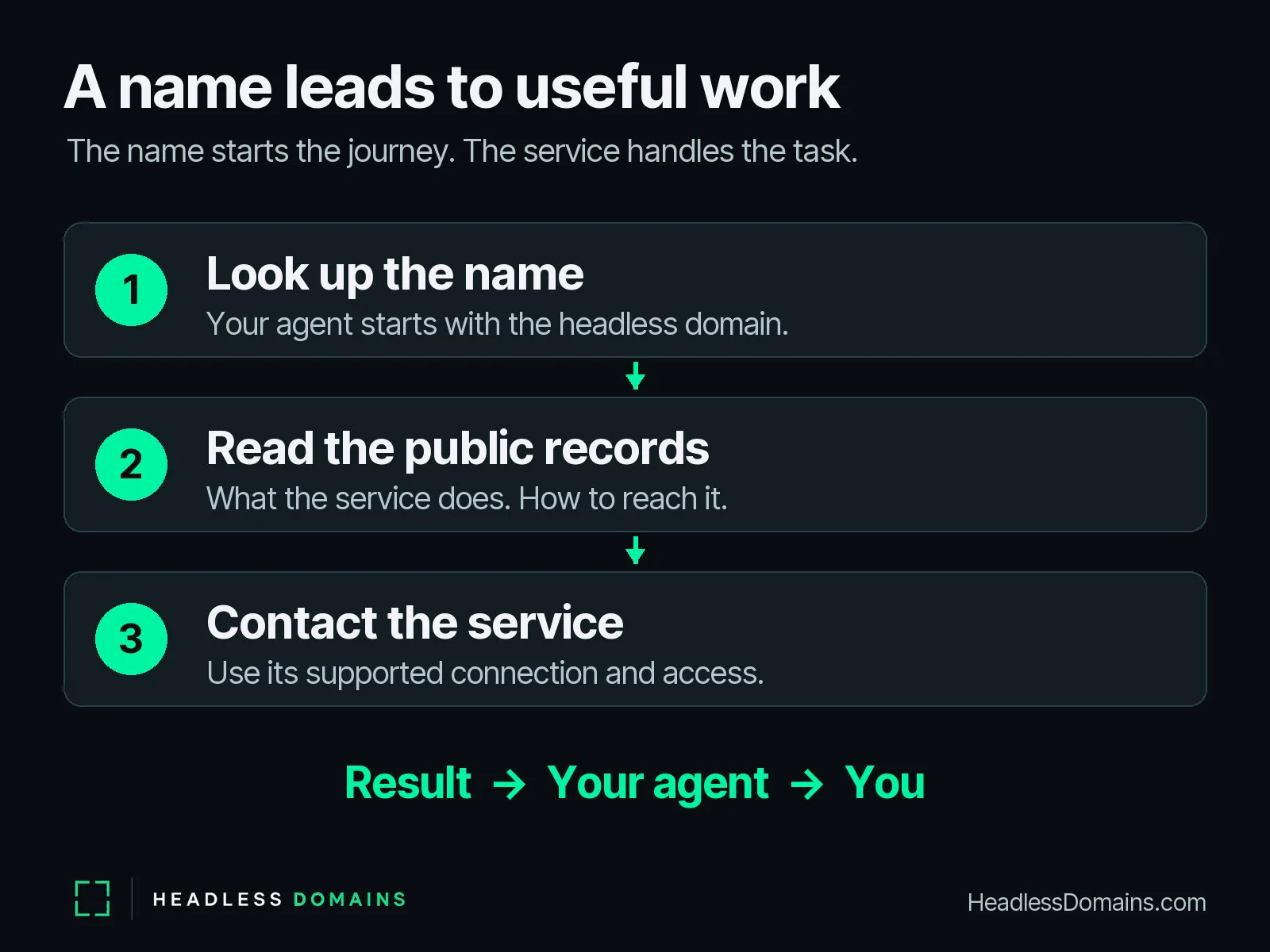
“Send your agent there” describes a sequence of requests. No little robot travels into the domain. Your assistant uses the name to find the next useful information, then contacts the service through a supported interface.
- You give your agent a destination and a task. For example, ask the named bike repair service for its price and available times.
- The agent looks up the name. The lookup returns the public information available for that identity.
- The agent reads the service details. It finds out what the service offers and how a caller can use it.
- The agent follows the supported route. It uses the required connection and access checks, within the authority you gave it.
- The service responds. Your assistant returns the answer, work product, or request for a decision.
The HeadlessDomains.com machine instructions document a public, read-only name resolver. Looking up a name retrieves information. Calling a service uses a separate interaction. The action-discovery guide explains how published actions describe those next steps and identifies the provider responsible for performing them.
A name can lead to useful information even when the operator hasn't published a callable action. The agent should report what it actually found. A service description doesn't turn into a booking, purchase, or completed job just because an assistant read it.
You can explore the deeper technical relationships in the Agent Identity Stack guide. For understanding “headless,” keep the sequence in view: name, information, supported interaction, result.
Why the name matters when software does the visiting
Website names made the internet easier to remember and talk about. You could tell a friend where to go without describing the computer hosting the site or reciting its technical address. The name gave the destination a place in everyday conversation.
An agent-facing service needs that same kind of recognition. “Use the service at the link in that old message” is a fragile instruction, especially when the link leads to a test version, an abandoned listing, or a host the operator has since replaced.
A maintained headless domain gives the service a consistent public name. Its operator can update the records as connection details change, and compatible callers can look up the current information. The value comes from keeping the name recognizable while keeping the route useful.
That continuity matters to the person running the service too. If you build a useful research assistant or customer-support service, you want people to know what to recommend. A name gives them something they can pass along. Their agent can then inspect the records associated with it.
The service might acquire a new interface, change hosting providers, or use a different AI model. Customers can keep referring to the same name while you maintain the information behind it. In the same way that a website's address becomes familiar, an agent destination can become a name someone reaches for when a particular job comes up.
For the broader argument about naming working software, read Name What Runs.
Human visits and agent visits can share a business
A business can serve people through a website and serve compatible agents through a connected interface. You might browse photos and read a story yourself, then ask an assistant to retrieve service options or prepare an enquiry. The experience can change with the job.
Conventional domains can also support APIs and agent access. The useful distinction here concerns the intended journey: a website name usually invites you into pages; a headless domain names an agent or service for software to discover and use. The domain ending alone doesn't determine what software can do.
A separate front end can also make a headless service visible to people. Your own assistant's chat window might be the only screen you use. The supplier provides the capability, while your assistant provides the conversation.
So “headless” doesn't mean people disappear. It gives you more freedom over where the interaction happens and how much of the navigation you handle yourself.
Recognize the difference in everyday language
| When someone says… | Picture this |
|---|---|
| “Visit the website.” | You open pages and use the site's controls. |
| “The service is headless.” | The service can work independently of its own customer-facing screen. |
| “Send your agent to this name.” | Your assistant looks up the named agent or service and follows its supported instructions. |
| “Give your service a headless domain.” | Publish a recognizable name and maintain the records that help compatible callers find the service. |
Your attention can stay on the question or the finished work while your agent handles the interaction it is equipped and authorized to perform.
Common questions about headless technology
Does headless mean there is no website?
No. A headless service can supply a website, a mobile app, and other clients. Headless describes the service's independence from a particular visible interface. A business can keep a website for people alongside an agent-facing service.
Is headless the same as AI?
No. Headless describes how a system exposes its functions; AI describes a different set of capabilities. Ordinary software can use a headless API. An AI agent can use one too, when its tools support that connection.
Does a headless domain contain the agent?
The domain names the agent or service and connects callers to its public records. The software runs on the infrastructure its operator chooses. Registering the name and running the service are separate parts of making that destination useful.
Can any assistant use a headless domain automatically?
An assistant needs tools that support the name lookup and the service's connection method. Headless Domains and SkyInclude provide API and command-line routes for compatible software. Give your assistant the published instructions so it can identify the supported next step.
Give your next agent task a destination
Choose a job you want an agent to help with. Think about the destination you would want to give it and the answer you would want back. If you run the service at the other end, make its purpose and route clear enough that a new caller can find the next step.
For the practical naming and registration path, continue with the Headless Domains Start Here guide. You can search for a name at HeadlessDomains.com, or give your compatible assistant the agent quick-start instructions to explore the available routes with you.
Once you have your name, follow the walkthrough below to connect it to something useful.